
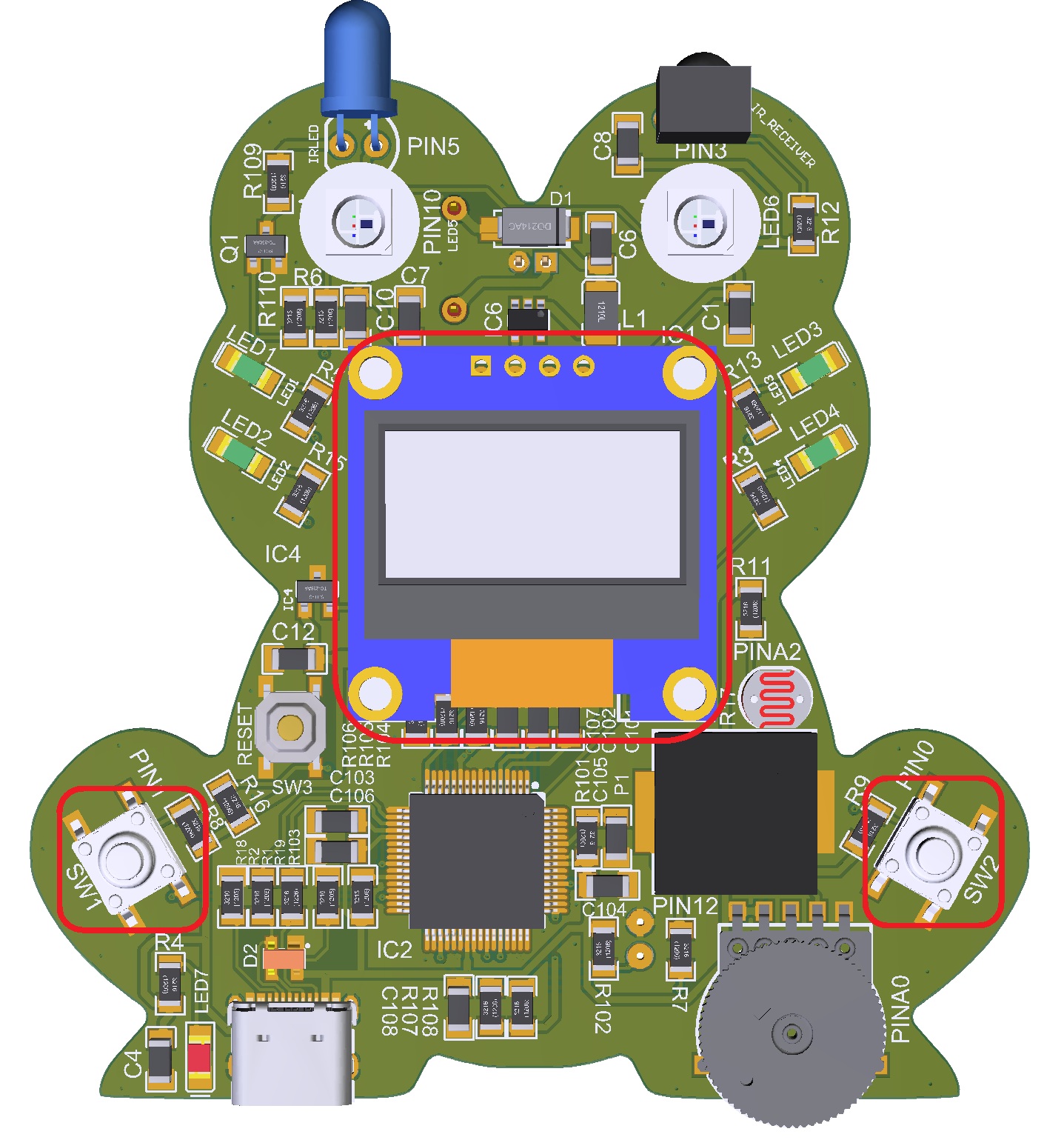
The program is an event-driven countdown timer that uses button inputs to control different modes of operation. It is organized as a state machine with three main modes: setting the time, running the countdown, and triggering an alarm when time reaches zero.
Project Code:
					/*
  ----------------------------------------------------------
  Frog Countdown Timer
  ----------------------------------------------------------
  Behavior
    • Boot screen: title "Timer" + instructions.
    • Press ANY button → enter Set screen showing big "MM:SS".
    • RIGHT (hold): +1 s at 2 steps/sec; after 5 s hold → 20 steps/sec.
    • LEFT  (hold): −1 s at 2 steps/sec; after 5 s hold → 20 steps/sec.
    • Release all; then press BOTH (within grace window) → start countdown.
    • At 00:00 → piezo beeps with increasing urgency for ~5 s.
    • After alarm → return to big "00:00" and wait for adjustments.

  Educational Notes
    • Demonstrates event-driven programming and timing with millis().
    • Models UI state-machine design using an enum for program modes.
    • Good example of input debouncing and multi-button logic.

  Hardware (Arduino UNO R4 based Frog board)
    • OLED (SSD1306 128x64) via I2C
    • LEFT button  = BUTTON_ONE (pin 1)   [active-LOW]
    • RIGHT button = BUTTON_TWO (pin 0)   [active-LOW]
    • Piezo buzzer = PIEZO (pin 12)
*/

#include "Arduino.h"
#include "1ST_Maker_Frog.h"   // provides display, pixel, and pin constants

// ---------- Constants & Types -------------------------------------------------

const uint8_t LEFT_BTN  = BUTTON_ONE;   // more readable aliases
const uint8_t RIGHT_BTN = BUTTON_TWO;   // than numeric pin numbers

// Step-speed behavior for hold actions
const uint32_t HOLD_ACCEL_MS   = 2500UL;  // after 2.5 s, accelerate
const uint32_t STEP_SLOW_MS    = 500UL;   // 2 steps per second
const uint32_t STEP_FAST_MS    = 50UL;    // 20 steps per second

// Small delay window for detecting “both” presses
const uint16_t BOTH_GRACE_MS   = 125;     // feel-tested; adjust in milliseconds as needed

// Display and alarm constants
const uint8_t  BIG_TEXT_SIZE   = 4;
const uint8_t  TITLE_TEXT_SIZE = 2;
const uint32_t ALARM_TOTAL_MS  = 5000UL;  // run alarm for 5 s
const uint16_t ALARM_ON_MS     = 60;      // beep on duration
const uint16_t ALARM_OFF_MS    = 40;      // pause between beeps

// Program mode state machine
enum Mode { MODE_WELCOME, MODE_SET, MODE_COUNTDOWN, MODE_ALARM };
Mode mode = MODE_WELCOME;                 // start in welcome screen

// ---------- Globals -----------------------------------------------------------

volatile long totalSeconds = 0;           // countdown value in seconds
bool     seenAllReleased   = false;       // used to detect a fresh “both” press

// bookkeeping for auto-repeat behavior
bool     leftWasDown  = false;
bool     rightWasDown = false;
uint32_t leftDownAtMs = 0;
uint32_t rightDownAtMs= 0;
uint32_t nextStepLeftMs  = 0;
uint32_t nextStepRightMs = 0;

// countdown tracking
uint32_t lastTickMs = 0;

// tracking for both-button grace
bool     bothGraceArmed   = false;
uint32_t bothGraceStartMs = 0;

// ============================================================================
//  Button helper functions – read current button state
// ============================================================================
inline bool btnLeftDown()  { return digitalRead(LEFT_BTN)  == PRESSED; }
inline bool btnRightDown() { return digitalRead(RIGHT_BTN) == PRESSED; }
inline bool bothDown()     { return btnLeftDown() && btnRightDown(); }
inline bool noneDown()     { return !btnLeftDown() && !btnRightDown(); }

// ============================================================================
//  drawCenteredBigTime
//  Show current time in large “MM:SS” format centered on display.
// ============================================================================
void drawCenteredBigTime(long seconds)
{
  // Keep value within bounds 0–5999 s (99 min 59 s)
  seconds = constrain(seconds, 0, 5999);
  uint8_t mm = seconds / 60;
  uint8_t ss = seconds % 60;

  char buf[6];
  snprintf(buf, sizeof(buf), "%02u:%02u", mm, ss);

  // Clear screen and draw centered
  display.clearDisplay();
  display.setTextSize(BIG_TEXT_SIZE);
  display.setTextColor(SSD1306_WHITE);

  // crude centering math based on font size
  int16_t x = (SCREEN_WIDTH  - (6 * BIG_TEXT_SIZE * 5)) / 2;
  int16_t y = (SCREEN_HEIGHT - (8 * BIG_TEXT_SIZE)) / 2;
  display.setCursor(x, y);
  display.print(buf);
  display.display();
}

// ============================================================================
//  drawWelcome
//  Display the splash / instruction screen at startup.
// ============================================================================
void drawWelcome()
{
  display.clearDisplay();
  display.setTextColor(SSD1306_WHITE);

  display.setTextSize(TITLE_TEXT_SIZE);
  display.setCursor(0, 0);
  display.println(F("   Timer"));

  display.setTextSize(1);
  display.println();
  display.println(F("    Right: + time"));
  display.println(F("    Left : - time"));
  display.println(F("    Both : start"));
  display.println();
  display.println(F("   Press any button"));
  display.display();
}

// ============================================================================
//  drawSetScreen
//  Wrapper to refresh the current time display.
// ============================================================================
void drawSetScreen() { drawCenteredBigTime(totalSeconds); }

// ============================================================================
//  handleSetButton
//  Increment or decrement time when a button is held down.
// ============================================================================
void handleSetButton(uint8_t pin, bool &wasDown, uint32_t &downAtMs,
                     uint32_t &nextStepMs, int stepDir)
{
  const bool isDown = (digitalRead(pin) == PRESSED);
  const uint32_t now = millis();

  // detect edges of press/release
  if (isDown && !wasDown) {              // just pressed
    wasDown   = true;
    downAtMs  = now;
    nextStepMs= now;                     // first change happens instantly
  } else if (!isDown && wasDown) {       // just released
    wasDown = false;
  }

  // if still holding, handle auto-repeat
  if (isDown) {
    const uint32_t heldFor = now - downAtMs;
    const uint32_t cadence = (heldFor >= HOLD_ACCEL_MS)
                             ? STEP_FAST_MS : STEP_SLOW_MS;

    // time for another increment/decrement?
    if (now >= nextStepMs) {
      long candidate = totalSeconds + stepDir;   // +1 s or −1 s
      candidate = constrain(candidate, 0, 5999L);
      if (candidate != totalSeconds) {
        totalSeconds = candidate;
        drawSetScreen();                         // update display immediately
      }
      nextStepMs += cadence;                     // schedule next step
    }
  }
}

// ============================================================================
//  runAlarm
//  Make buzzer chirp and NeoPixel eyes flash for five seconds.
// ============================================================================
void runAlarm()
{
  const uint32_t startMs = millis();
  uint32_t now = startMs;

  pixel.begin();      // ensure NeoPixels initialized
  pixel.clear();
  pixel.show();

  while ((now = millis()) - startMs < ALARM_TOTAL_MS) {
    uint32_t elapsed = now - startMs;

    // Map 0→5000 ms to frequency range 220→1200 Hz for rising pitch
    uint16_t freq = 220 + (elapsed * 1000UL) / ALARM_TOTAL_MS;

    // shorten off-gap slightly as time passes (feels more urgent)
    uint16_t offGap = ALARM_OFF_MS - (elapsed * 20UL) / ALARM_TOTAL_MS;

    tone(PIEZO, freq);           // start tone
    delay(ALARM_ON_MS);          // short beep
    noTone(PIEZO);               // silence

    // Dim red eye blink proportional to elapsed time
    uint8_t level = map(elapsed, 0, ALARM_TOTAL_MS, 16, 64);
    pixel.setPixelColor(0, pixel.Color(level, 0, 0));
    pixel.setPixelColor(1, pixel.Color(level, 0, 0));
    pixel.show();

    delay(offGap);               // pause before next beep
  }

  // tidy up
  noTone(PIEZO);
  pixel.clear();
  pixel.show();
}

// ============================================================================
//  setup
//  Initialize hardware and show the welcome screen.
// ============================================================================
void setup()
{
  pinMode(LEFT_BTN,  INPUT_PULLUP);   // active-LOW buttons
  pinMode(RIGHT_BTN, INPUT_PULLUP);
  pinMode(PIEZO,     OUTPUT);

  // initialize OLED display; fail-soft if absent
  if (!display.begin(SSD1306_SWITCHCAPVCC, SCREEN_ADDRESS)) {
    // Could flash NeoPixels here to signal failure
  }

  display.clearDisplay();
  drawWelcome();
  mode = MODE_WELCOME;
}

// ============================================================================
//  loop
//  Main state-machine loop. Handles grace-timing for both buttons.
// ============================================================================
void loop()
{
  const uint32_t now = millis();

  switch (mode) {

    // --------------------------------------------------------
    // WELCOME SCREEN
    // --------------------------------------------------------
    case MODE_WELCOME:
      if (btnLeftDown() || btnRightDown()) {
        // any button → enter set mode
        totalSeconds = constrain(totalSeconds, 0, 5999);
        drawSetScreen();
        mode = MODE_SET;

        // reset all state trackers
        seenAllReleased = false;
        leftWasDown = rightWasDown = false;
        bothGraceArmed = false;
      }
      break;

    // --------------------------------------------------------
    // SET MODE: adjusting countdown value
    // --------------------------------------------------------
    case MODE_SET:
      // if both released, we can arm a new grace window
      if (noneDown()) {
        seenAllReleased = true;
        bothGraceArmed = false;
      }

      // first button press after full release → arm grace window
      if (seenAllReleased && (btnLeftDown() || btnRightDown()) && !bothGraceArmed) {
        bothGraceArmed   = true;
        bothGraceStartMs = now;
      }

      // If within the grace window, wait to see if the other button joins in
      if (bothGraceArmed) {
        if (bothDown()) {
          // Treat as BOTH — start countdown without changing time
          if (totalSeconds > 0) {
            lastTickMs = now;
            mode = MODE_COUNTDOWN;
          }
          // lock state until buttons released again
          seenAllReleased = false;
          bothGraceArmed = false;
          break; // skip rest of logic
        }

        // Still inside grace window → do nothing yet
        if ((now - bothGraceStartMs) < BOTH_GRACE_MS)
          break;

        // grace expired → resume normal single-button behavior
        bothGraceArmed = false;
      }

      // Normal adjustment after grace window
      handleSetButton(LEFT_BTN,  leftWasDown,  leftDownAtMs,  nextStepLeftMs,  -1);
      handleSetButton(RIGHT_BTN, rightWasDown, rightDownAtMs, nextStepRightMs, +1);
      break;

    // --------------------------------------------------------
    // COUNTDOWN MODE
    // --------------------------------------------------------
    case MODE_COUNTDOWN:
      // Decrement once per second using millis() instead of delay()
      if (now - lastTickMs >= 1000UL) {
        lastTickMs += 1000UL;

        if (totalSeconds > 0) {
          totalSeconds--;
          drawCenteredBigTime(totalSeconds);     // refresh display
        }
        if (totalSeconds == 0) mode = MODE_ALARM;
      }
      break;

    // --------------------------------------------------------
    // ALARM MODE
    // --------------------------------------------------------
    case MODE_ALARM:
      runAlarm();                                // play sound and light
      totalSeconds = 0;
      drawSetScreen();                           // return to “00:00”
      mode = MODE_SET;                           // back to set mode
      seenAllReleased = false;
      leftWasDown = rightWasDown = false;
      bothGraceArmed = false;
      break;
  }
}
*If you’re copying and pasting the code, or typing from scratch, delete everything out of a new Arduino sketch and paste / type in the above text.