
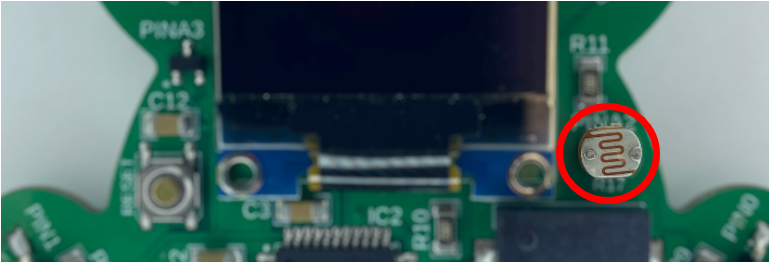
In this project you’ll 小夫妻的新婚夜免费播放第5季 what an LDR is and how to analogRead it to determine light intensity.
Project Code:
					///////////////////////////////////////////////////
//8.00 - Reading Light Intensity

byte lightSensorPin = A2;

void setup() {
  pinMode(lightSensorPin, INPUT);
  Serial.begin(9600);
}

void loop() {
  Serial.print("The light level is at: ");
  Serial.println(analogRead(lightSensorPin));
  delay(1000);
}

///////////////////////////////////////////////////
*If you’re copying and pasting the code, or typing from scratch, delete everything out of a new Arduino sketch and paste / type in the above text.
Reading the LDR is exactly the same as reading the potentiometer.
The pin that is connected to the LDR is an analog pin.
byte lightSensorPin = A2;
The LDR is going to have an analog voltage, which is read using analogRead. It is then printed out onto the Serial monitor. Make sure and open the Serial port to see the data being printed.
Serial.print("The light level is at: "); Serial.println(analogRead(lightSensorPin));
There is then a delay to keep the Serial port from being flooded with messages.
delay(1000);
The LDR will read more voltage the darker it is. We can use this information to control outputs based on the light intensity.