
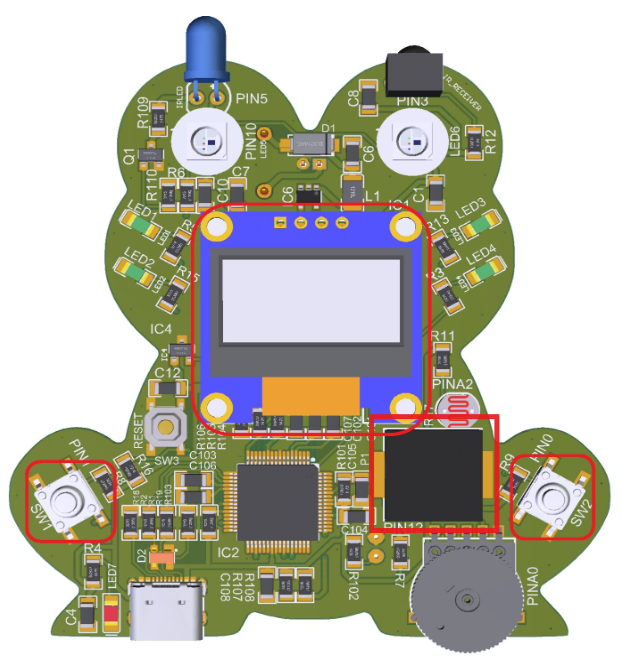
This lesson introduces students to programming and embedded systems by analyzing and modifying a Rock–Paper–Scissors game running on the Frog board. Students explore how inputs, outputs, randomness, and state machines work together in code, then extend the program by adding their own features or changes.
Project Code:
					/*
  Program: Rock_Paper_Scissors.ino
  Copyright (C) 艹+豆, Inc. 2025

  Play a simple Rock–Paper–Scissors game using the Frog board.

  - On power-up, the OLED shows the game title and “Press any button”.
  - When a button is pressed, the game “shuffles” through the Rock/Paper/Scissors
    graphics on the left side of the OLED while playing tones on the piezo.
  - After a short time, a random choice is selected and shown on the left, with
    the name (Rock, Paper, or Scissors) centered on the right side of the display.
  - When the user presses a button again (having previously released the button),
    the game returns to the shuffling animation and chooses another random outcome.

  Copyright (C) 艹+豆, Inc. 2025
*/

#include "1ST_Maker_Frog.h"

// ---------------------------------------------------------------------------
//  Constants and configuration
// ---------------------------------------------------------------------------

// Rock, Paper, Scissors graphics

const uint8_t Rock64_MSB[] PROGMEM = {
  0xFF, 0xFF, 0xFF, 0xFF, 0xFF, 0xFF, 0xFF, 0xFF, 0xFF, 0xFF, 0xFF, 0xFF, 0xFF, 0xFF, 0xFF, 0xFF,
  0xFF, 0xFF, 0xFF, 0xFF, 0xFF, 0xFF, 0xFF, 0xFF, 0xFF, 0xFF, 0xFF, 0xFF, 0xFF, 0xFF, 0xFF, 0xFF,
  0xFF, 0xFF, 0xFF, 0xFF, 0xFF, 0xFF, 0xFF, 0xFF, 0xFF, 0xFF, 0xFF, 0xFF, 0xFF, 0xFF, 0xFF, 0xFF,
  0xFF, 0xFF, 0xFF, 0xFF, 0xFF, 0xFF, 0xFF, 0xFF, 0xFF, 0xFF, 0xFF, 0xFF, 0xFF, 0xFF, 0xFF, 0xFF,
  0xFF, 0xFF, 0xFF, 0xFF, 0xFF, 0xFF, 0xFF, 0xFF, 0xFF, 0xFF, 0xFF, 0xFF, 0xFF, 0xFF, 0xFF, 0xFF,
  0xFF, 0xFF, 0xFF, 0xFF, 0xFF, 0xFF, 0xFF, 0xFF, 0xFF, 0xFF, 0xFF, 0xFF, 0xFF, 0xFF, 0xFF, 0xFF,
  0xFF, 0xFF, 0xFF, 0xFF, 0xFF, 0xFF, 0xFF, 0xFF, 0xFF, 0xFF, 0xFF, 0xFF, 0xFF, 0xFF, 0xFF, 0xFF,
  0xFF, 0xFF, 0xFF, 0xFF, 0xFF, 0xFF, 0xFF, 0xFF, 0xFF, 0xFF, 0xFF, 0xFF, 0xFF, 0xFF, 0xFF, 0xFF,
  0xFF, 0xFF, 0xFF, 0xFF, 0xFF, 0xFF, 0xFF, 0xFF, 0xFF, 0xFF, 0xFF, 0xFF, 0xFF, 0xFF, 0xFF, 0xFF,
  0xFF, 0xFF, 0xFF, 0xFF, 0xFF, 0xFF, 0xFF, 0xFF, 0xFF, 0xFF, 0xFF, 0xFE, 0x00, 0x7F, 0xFF, 0xFF,
  0xFF, 0xFF, 0xC0, 0x38, 0x38, 0x18, 0x03, 0xFF, 0xFC, 0x0F, 0x00, 0x00, 0xFE, 0x00, 0x01, 0xFF,
  0xE0, 0x02, 0x0F, 0x81, 0xFF, 0x81, 0xF0, 0x7F, 0xC3, 0xE0, 0x3F, 0xE1, 0xFF, 0x87, 0xFC, 0x7F,
  0x87, 0xF8, 0x7F, 0xE1, 0xFF, 0x8F, 0xFC, 0x7F, 0x0F, 0xFC, 0x7F, 0xE1, 0xFF, 0x8F, 0xFC, 0x3F,
  0x0F, 0xFC, 0x7F, 0xE1, 0xFF, 0x8F, 0xFC, 0x3F, 0x0F, 0xFC, 0x70, 0x00, 0x00, 0x00, 0x00, 0x0F,
  0x0F, 0xFC, 0x60, 0x00, 0x00, 0x00, 0x00, 0x03, 0x0F, 0xFC, 0x61, 0xFF, 0xFF, 0xFF, 0xFF, 0xE1,
  0x0F, 0xFC, 0x71, 0xFF, 0xFF, 0xFF, 0xFF, 0xF0, 0x0F, 0xFC, 0x70, 0xFF, 0xFF, 0xFF, 0xFF, 0xF0,
  0x0F, 0xFC, 0x78, 0x3F, 0xFF, 0xFF, 0xFF, 0xF0, 0x0F, 0xFC, 0x7C, 0x1F, 0xFF, 0xFF, 0xFF, 0xF0,
  0x0F, 0xF8, 0x7F, 0x01, 0xFF, 0xFF, 0xFF, 0xF0, 0x03, 0xF0, 0x3F, 0xC0, 0x00, 0x00, 0x1F, 0xF0,
  0x00, 0x00, 0x1F, 0x80, 0x00, 0x00, 0x3F, 0xF0, 0x08, 0x07, 0x00, 0x00, 0x00, 0x1F, 0xFF, 0xF0,
  0x0F, 0xFF, 0xC0, 0x1E, 0x01, 0xFF, 0xFF, 0xF0, 0x0F, 0xFF, 0xFF, 0xFF, 0x07, 0xFF, 0xFF, 0xF0,
  0x0F, 0xFF, 0xFF, 0xFE, 0x1F, 0xFF, 0xFF, 0xF0, 0x0F, 0xFF, 0xFF, 0xFC, 0x3F, 0xFF, 0xFF, 0xF0,
  0x0F, 0xFF, 0xFF, 0xF8, 0x7F, 0xFF, 0xFF, 0xF0, 0x0F, 0xFF, 0xFF, 0xF8, 0xFF, 0xFF, 0xFF, 0xF0,
  0x0F, 0xFF, 0xFF, 0xF0, 0xFF, 0xFF, 0xFF, 0xF0, 0x0F, 0xFF, 0xFF, 0xF1, 0xFF, 0xFF, 0xFF, 0xF0,
  0x0F, 0xFF, 0xFF, 0xF1, 0xFF, 0xFF, 0xFF, 0xF0, 0x8F, 0xFF, 0xFF, 0xE1, 0xFF, 0xFF, 0xFF, 0xF1,
  0x8F, 0xFF, 0xFF, 0xE3, 0xFF, 0xFF, 0xFF, 0xF1, 0x87, 0xFF, 0xFF, 0xFF, 0xFF, 0xFF, 0xFF, 0xE1,
  0xC3, 0xFF, 0xFF, 0xFF, 0xFF, 0xFF, 0xFF, 0xE3, 0xE3, 0xFF, 0xFF, 0xFF, 0xFF, 0xFF, 0xFF, 0xC3,
  0xE1, 0xFF, 0xFF, 0xFF, 0xFF, 0xFF, 0xFF, 0x87, 0xF0, 0xFF, 0xFF, 0xFF, 0xFF, 0xFF, 0xFF, 0x0F,
  0xF8, 0x7F, 0xFF, 0xFF, 0xFF, 0xFF, 0xFE, 0x1F, 0xFC, 0x3F, 0xFF, 0xFF, 0xFF, 0xFF, 0xFC, 0x3F,
  0xFE, 0x0F, 0xFF, 0xFF, 0xFF, 0xFF, 0xF0, 0x7F, 0xFF, 0x87, 0xFF, 0xFF, 0xFF, 0xFF, 0xE0, 0xFF,
  0xFF, 0xC1, 0xFF, 0xFF, 0xFF, 0xFF, 0x83, 0xFF, 0xFF, 0xF0, 0x3F, 0xFF, 0xFF, 0xFC, 0x0F, 0xFF,
  0xFF, 0xFC, 0x07, 0xFF, 0xFF, 0xE0, 0x3F, 0xFF, 0xFF, 0xFF, 0x80, 0x1F, 0xF8, 0x01, 0xFF, 0xFF,
  0xFF, 0xFF, 0xF8, 0x00, 0x00, 0x1F, 0xFF, 0xFF, 0xFF, 0xFF, 0xFF, 0xC0, 0x01, 0xFF, 0xFF, 0xFF
};

static const uint16_t Rock64_MSB_WIDTH  = 64;
static const uint16_t Rock64_MSB_HEIGHT = 64;

const uint8_t Paper64_MSB[] PROGMEM = {
  0xFF, 0xFF, 0xFF, 0xFC, 0x1F, 0xFF, 0xFF, 0xFF, 0xFF, 0xFF, 0xFF, 0xE0, 0x07, 0xFF, 0xFF, 0xFF,
  0xFF, 0xFF, 0xFF, 0xC3, 0xC3, 0xFF, 0xFF, 0xFF, 0xFF, 0xFF, 0xFF, 0x8F, 0xF1, 0xFF, 0xFF, 0xFF,
  0xFF, 0xFF, 0xC7, 0x8F, 0xF1, 0xFF, 0xFF, 0xFF, 0xFF, 0xFE, 0x00, 0x0F, 0xF0, 0xC3, 0xFF, 0xFF,
  0xFF, 0xFC, 0x38, 0x0F, 0xF8, 0x00, 0x7F, 0xFF, 0xFF, 0xF8, 0xFF, 0x1F, 0xF8, 0x18, 0x3F, 0xFF,
  0xFF, 0xF1, 0xFF, 0x9F, 0xF8, 0x7E, 0x1F, 0xFF, 0xFF, 0xF1, 0xFF, 0x9F, 0xF8, 0xFF, 0x0F, 0xFF,
  0xFF, 0xF1, 0xFF, 0x9F, 0xF9, 0xFF, 0x8F, 0xFF, 0xFF, 0xF1, 0xFF, 0x9F, 0xF9, 0xFF, 0x8F, 0xFF,
  0xFC, 0x71, 0xFF, 0x9F, 0xF9, 0xFF, 0x8F, 0xFF, 0xE0, 0x01, 0xFF, 0x9F, 0xF9, 0xFF, 0x8F, 0xFF,
  0xC1, 0xC1, 0xFF, 0x9F, 0xF9, 0xFF, 0x8F, 0xFF, 0x8F, 0xE1, 0xFF, 0x9F, 0xF9, 0xFF, 0x8F, 0xFF,
  0x1F, 0xF1, 0xFF, 0x9F, 0xF9, 0xFF, 0x8F, 0xFF, 0x1F, 0xF1, 0xFF, 0x9F, 0xF9, 0xFF, 0x8F, 0xFF,
  0x1F, 0xF1, 0xFF, 0x9F, 0xF9, 0xFF, 0x8F, 0xFF, 0x1F, 0xF1, 0xFF, 0x9F, 0xF9, 0xFF, 0x8F, 0xE7,
  0x1F, 0xF1, 0xFF, 0x9F, 0xF9, 0xFF, 0x8F, 0x83, 0x1F, 0xF1, 0xFF, 0x9F, 0xF9, 0xFF, 0x8F, 0x11,
  0x1F, 0xF1, 0xFF, 0x9F, 0xF9, 0xFF, 0x8C, 0x78, 0x1F, 0xF1, 0xFF, 0x9F, 0xF9, 0xFF, 0x80, 0x78,
  0x1F, 0xF1, 0xFF, 0x9F, 0xF9, 0xFF, 0x81, 0xF8, 0x1F, 0xF1, 0xFF, 0x9F, 0xF9, 0xFF, 0x83, 0xF8,
  0x1F, 0xF1, 0xFF, 0x9F, 0xF9, 0xFF, 0x87, 0xF8, 0x1F, 0xF1, 0xFF, 0x9F, 0xF9, 0xFF, 0x8F, 0xF8,
  0x1F, 0xF1, 0xFF, 0x0F, 0xF0, 0xFF, 0x8F, 0xF8, 0x1F, 0xF1, 0xFC, 0x03, 0xF0, 0xFF, 0x8F, 0xF8,
  0x1F, 0xE0, 0xFC, 0x03, 0xC0, 0x1F, 0x8F, 0xF8, 0x1F, 0x80, 0x3F, 0xFF, 0xCB, 0x3F, 0x8F, 0xF8,
  0x1F, 0xDF, 0x3F, 0xFF, 0xFF, 0xFF, 0x8F, 0xF8, 0x1F, 0xFF, 0xFF, 0xFF, 0xFF, 0xFF, 0x8F, 0xF8,
  0x1F, 0xFF, 0xFF, 0xFF, 0xFF, 0xFF, 0x8F, 0xF8, 0x1F, 0xFF, 0xFF, 0xFF, 0xFF, 0xFF, 0x8F, 0xF8,
  0x1F, 0xFF, 0xFF, 0xFF, 0xFF, 0xFF, 0x8F, 0xF8, 0x1F, 0xFF, 0xFF, 0xFF, 0xFF, 0xFC, 0x0F, 0xF8,
  0x1F, 0xFF, 0xFF, 0xFF, 0xFF, 0x80, 0x1F, 0xF8, 0x1F, 0xFF, 0xFF, 0xFF, 0xFE, 0x03, 0xFF, 0xF8,
  0x1F, 0xFF, 0xFF, 0xFF, 0xF8, 0x1F, 0xFF, 0xF8, 0x1F, 0xFF, 0xFF, 0xFF, 0xE0, 0xFF, 0xFF, 0xF8,
  0x1F, 0xFF, 0xFF, 0xFF, 0xC3, 0xFF, 0xFF, 0xF8, 0x1F, 0xFF, 0xFF, 0xFF, 0x87, 0xFF, 0xFF, 0xF8,
  0x1F, 0xFF, 0xFF, 0xFF, 0x0F, 0xFF, 0xFF, 0xF8, 0x8F, 0xFF, 0xFF, 0xFF, 0x1F, 0xFF, 0xFF, 0xF8,
  0x8F, 0xFF, 0xFF, 0xFE, 0x3F, 0xFF, 0xFF, 0xF1, 0x8F, 0xFF, 0xFF, 0xFE, 0x3F, 0xFF, 0xFF, 0xF1,
  0x8F, 0xFF, 0xFF, 0xFE, 0x3F, 0xFF, 0xFF, 0xE1, 0xC7, 0xFF, 0xFF, 0xFE, 0x3F, 0xFF, 0xFF, 0xE3,
  0xE3, 0xFF, 0xFF, 0xFE, 0x7F, 0xFF, 0xFF, 0xC3, 0xE1, 0xFF, 0xFF, 0xFF, 0xFF, 0xFF, 0xFF, 0x87,
  0xF1, 0xFF, 0xFF, 0xFF, 0xFF, 0xFF, 0xFF, 0x8F, 0xF8, 0x7F, 0xFF, 0xFF, 0xFF, 0xFF, 0xFE, 0x0F,
  0xFC, 0x3F, 0xFF, 0xFF, 0xFF, 0xFF, 0xFC, 0x3F, 0xFE, 0x1F, 0xFF, 0xFF, 0xFF, 0xFF, 0xF8, 0x7F,
  0xFF, 0x0F, 0xFF, 0xFF, 0xFF, 0xFF, 0xF0, 0xFF, 0xFF, 0x83, 0xFF, 0xFF, 0xFF, 0xFF, 0xC1, 0xFF,
  0xFF, 0xE0, 0xFF, 0xFF, 0xFF, 0xFF, 0x07, 0xFF, 0xFF, 0xF8, 0x1F, 0xFF, 0xFF, 0xFC, 0x1F, 0xFF,
  0xFF, 0xFE, 0x03, 0xFF, 0xFF, 0xC0, 0x7F, 0xFF, 0xFF, 0xFF, 0x80, 0x1F, 0xF8, 0x01, 0xFF, 0xFF,
  0xFF, 0xFF, 0xF8, 0x00, 0x00, 0x3F, 0xFF, 0xFF, 0xFF, 0xFF, 0xFF, 0xC0, 0x03, 0xFF, 0xFF, 0xFF
};

static const uint16_t Paper64_MSB_WIDTH  = 64;
static const uint16_t Paper64_MSB_HEIGHT = 64;

const uint8_t Scissors64_MSB[] PROGMEM = {
  0xFF, 0xFF, 0xFF, 0xFC, 0x3F, 0xFF, 0xFF, 0xFF, 0xFF, 0xFF, 0xFF, 0xE0, 0x07, 0xFF, 0xFF, 0xFF,
  0xFF, 0xFF, 0xFF, 0x83, 0xC3, 0xFF, 0xFF, 0xFF, 0xFF, 0xFF, 0xFF, 0x8F, 0xE1, 0xFF, 0xFF, 0xFF,
  0xFF, 0xFF, 0xFF, 0x1F, 0xF1, 0xFF, 0xFF, 0xFF, 0xFF, 0xFF, 0xFF, 0x1F, 0xF8, 0xFF, 0x01, 0xFF,
  0xFF, 0xFF, 0xFF, 0x1F, 0xF8, 0xFC, 0x00, 0x7F, 0xFF, 0xFF, 0xFF, 0x1F, 0xF8, 0xF8, 0x7E, 0x3F,
  0xFF, 0xFF, 0xFF, 0x1F, 0xF8, 0xF1, 0xFF, 0x1F, 0xFF, 0xFF, 0xFF, 0x1F, 0xF8, 0xF1, 0xFF, 0x1F,
  0xFF, 0xFF, 0xFF, 0x1F, 0xF8, 0xE1, 0xFF, 0x1F, 0xFF, 0xFF, 0xFF, 0x1F, 0xF8, 0xE3, 0xFF, 0x1F,
  0xFF, 0xFF, 0xFF, 0x1F, 0xF8, 0xE3, 0xFE, 0x3F, 0xFF, 0xFF, 0xFF, 0x1F, 0xF8, 0xC3, 0xFE, 0x3F,
  0xFF, 0xFF, 0xFF, 0x1F, 0xF8, 0xC7, 0xFC, 0x7F, 0xFF, 0xFF, 0xFF, 0x1F, 0xF8, 0x87, 0xFC, 0x7F,
  0xFF, 0xFF, 0xFF, 0x1F, 0xF8, 0x8F, 0xFC, 0x7F, 0xFF, 0xFF, 0xFF, 0x1F, 0xF8, 0x8F, 0xF8, 0x7F,
  0xFF, 0xFF, 0xFF, 0x1F, 0xF8, 0x1F, 0xF8, 0xFF, 0xFF, 0xFF, 0xFF, 0x1F, 0xF8, 0x1F, 0xF8, 0xFF,
  0xFF, 0xFF, 0xFF, 0x1F, 0xF8, 0x1F, 0xF1, 0xE3, 0xFF, 0xFF, 0xFF, 0x1F, 0xF8, 0x3F, 0xF1, 0x01,
  0xFF, 0xFF, 0x81, 0x1F, 0xF8, 0x3F, 0xE0, 0x38, 0xFF, 0xFE, 0x00, 0x1F, 0xF8, 0x7F, 0xE0, 0x78,
  0xFF, 0xF8, 0x7C, 0x1F, 0xF8, 0x7F, 0xC1, 0xF8, 0xE0, 0x00, 0xFF, 0x1F, 0xF8, 0x7F, 0xC3, 0xF8,
  0xC3, 0x81, 0xFF, 0x1F, 0xF8, 0xFF, 0x87, 0xF8, 0x87, 0xE1, 0xFF, 0x1F, 0xF8, 0xFF, 0x8F, 0xF8,
  0x1F, 0xF1, 0xFF, 0x1F, 0xF8, 0xFF, 0x8F, 0xF8, 0x1F, 0xF1, 0xFF, 0x1F, 0xE0, 0x7F, 0x8F, 0xF8,
  0x1F, 0xF1, 0xFF, 0x1F, 0x80, 0x1F, 0x8F, 0xF8, 0x1F, 0xF1, 0xFF, 0x1F, 0xC7, 0x3F, 0x8F, 0xF8,
  0x1F, 0xF1, 0xFF, 0x1F, 0xFF, 0xFF, 0x8F, 0xF8, 0x1F, 0xF1, 0xFF, 0x1F, 0xFF, 0xFF, 0x8F, 0xF8,
  0x1F, 0xF1, 0xFF, 0x1F, 0xFF, 0xFF, 0x8F, 0xF8, 0x1F, 0xF1, 0xFF, 0x1F, 0xFF, 0xFF, 0x8F, 0xF8,
  0x1F, 0xF1, 0xFF, 0x1F, 0xFF, 0xFF, 0x8F, 0xF8, 0x1F, 0xF0, 0xFF, 0x1F, 0xFF, 0xF8, 0x1F, 0xF8,
  0x0F, 0xE0, 0x7E, 0x1F, 0xFF, 0x80, 0x3F, 0xF8, 0x01, 0x00, 0x10, 0x3F, 0xFC, 0x07, 0xFF, 0xF8,
  0x00, 0x0E, 0x00, 0xFF, 0xF8, 0x1F, 0xFF, 0xF8, 0x1F, 0xFF, 0xFF, 0xFF, 0xE0, 0xFF, 0xFF, 0xF8,
  0x1F, 0xFF, 0xFF, 0xFF, 0xC3, 0xFF, 0xFF, 0xF8, 0x1F, 0xFF, 0xFF, 0xFF, 0x87, 0xFF, 0xFF, 0xF8,
  0x1F, 0xFF, 0xFF, 0xFF, 0x0F, 0xFF, 0xFF, 0xF8, 0x1F, 0xFF, 0xFF, 0xFF, 0x1F, 0xFF, 0xFF, 0xF9,
  0x0F, 0xFF, 0xFF, 0xFE, 0x3F, 0xFF, 0xFF, 0xF1, 0x8F, 0xFF, 0xFF, 0xFE, 0x3F, 0xFF, 0xFF, 0xF1,
  0x8F, 0xFF, 0xFF, 0xFE, 0x3F, 0xFF, 0xFF, 0xE3, 0xC7, 0xFF, 0xFF, 0xFE, 0x7F, 0xFF, 0xFF, 0xE3,
  0xC3, 0xFF, 0xFF, 0xFE, 0x7F, 0xFF, 0xFF, 0xC7, 0xE3, 0xFF, 0xFF, 0xFF, 0xFF, 0xFF, 0xFF, 0x87,
  0xF1, 0xFF, 0xFF, 0xFF, 0xFF, 0xFF, 0xFF, 0x0F, 0xF8, 0xFF, 0xFF, 0xFF, 0xFF, 0xFF, 0xFF, 0x1F,
  0xF8, 0x7F, 0xFF, 0xFF, 0xFF, 0xFF, 0xFC, 0x3F, 0xFE, 0x1F, 0xFF, 0xFF, 0xFF, 0xFF, 0xF8, 0x7F,
  0xFF, 0x0F, 0xFF, 0xFF, 0xFF, 0xFF, 0xE0, 0xFF, 0xFF, 0x83, 0xFF, 0xFF, 0xFF, 0xFF, 0xC1, 0xFF,
  0xFF, 0xE0, 0xFF, 0xFF, 0xFF, 0xFF, 0x07, 0xFF, 0xFF, 0xF8, 0x3F, 0xFF, 0xFF, 0xFC, 0x1F, 0xFF,
  0xFF, 0xFE, 0x03, 0xFF, 0xFF, 0xC0, 0x7F, 0xFF, 0xFF, 0xFF, 0xC0, 0x1F, 0xF8, 0x03, 0xFF, 0xFF,
  0xFF, 0xFF, 0xF8, 0x00, 0x00, 0x3F, 0xFF, 0xFF, 0xFF, 0xFF, 0xFF, 0xE0, 0x07, 0xFF, 0xFF, 0xFF
};

static const uint16_t Scissors64_MSB_WIDTH  = 64;
static const uint16_t Scissors64_MSB_HEIGHT = 64;

// ---------------------------------------------------------------------------
//  Data structures and globals
// ---------------------------------------------------------------------------

struct Sprite {
  const uint8_t* data;
  uint16_t       w;
  uint16_t       h;
};

Sprite sprites[] = {
  { Rock64_MSB,     Rock64_MSB_WIDTH,     Rock64_MSB_HEIGHT     },
  { Paper64_MSB,    Paper64_MSB_WIDTH,    Paper64_MSB_HEIGHT    },
  { Scissors64_MSB, Scissors64_MSB_WIDTH, Scissors64_MSB_HEIGHT }
};

// Set the number of picture sprites
const uint8_t NUM_SPRITES = sizeof(sprites) / sizeof(sprites[0]);

const char* SPRITE_NAMES[NUM_SPRITES] = {
  "Rock",
  "Paper",
  "Scissors"
};

// Simple tones to play during shuffle (indexed by current sprite)
const uint16_t SHUFFLE_TONES[NUM_SPRITES] = {
  440, 660, 880
};

// Final "ta-da" chord when result is shown
const uint16_t RESULT_TONES[3] = {
  523, 659, 784   // C, E, G
};

// ---------------------------------------------------------------------------
//  Game state and timing
// ---------------------------------------------------------------------------

enum GameState {
  STATE_TITLE,      // Waiting at title screen
  STATE_SHUFFLING,  // Cycling graphics
  STATE_RESULT      // Showing chosen result
};

GameState     gameState        = STATE_TITLE;
uint8_t       currentSpriteIdx = 0;    // Which sprite is shown while shuffling
uint8_t       resultSpriteIdx  = 0;    // Which sprite was chosen as the result

unsigned long shuffleStartTime = 0;    // When the current shuffle started
unsigned long lastShuffleFrame = 0;    // Last time we advanced to the next sprite

const unsigned long SHUFFLE_INTERVAL = 200;   // ms between frames
const unsigned long SHUFFLE_DURATION = 2500;  // total shuffle time (ms)

// ---------------------------------------------------------------------------
//  Function prototypes
// ---------------------------------------------------------------------------
// In C, it's good practice to declare functions before they are used.
void showTitleScreen();
void startShuffle();
void updateShuffle();
void showResultScreen(uint8_t spriteIndex);
void playShuffleTone(uint8_t spriteIndex);
void playResultChord();

// ---------------------------------------------------------------------------
//  Setup and main loop
// ---------------------------------------------------------------------------

/**************************************************
 * Function: setup
 * Purpose:  Initializes hardware, seeds randomness,
 *           shows the title screen, and plays a
 *           short "ready" beep.
 **************************************************/
void setup() {

  // Buttons use internal pull-ups; PRESSED means the pin reads LOW.
  pinMode(BUTTON_ONE, INPUT_PULLUP);
  pinMode(BUTTON_TWO, INPUT_PULLUP);

  // Set LEDs as outputs and turn them off.
  for (uint8_t i = 0; i < 4; i++) {
    pinMode(LEDs[i], OUTPUT);
    digitalWrite(LEDs[i], LOW);
  }

  // Piezo is an output for sound.
  pinMode(PIEZO, OUTPUT);

  // Initialize the OLED display; stay here forever if it fails.
  if (!display.begin(SSD1306_SWITCHCAPVCC, SCREEN_ADDRESS)) {
    for (;;) { }
  }

  display.clearDisplay();
  display.setTextColor(SSD1306_WHITE);
  display.setTextSize(1);
  display.setRotation(0);

  // Use a potentiometer reading as a random seed so results vary each run.
  randomSeed(analogRead(A0));

  // Show the initial title screen.
  showTitleScreen();

  // Small "ready" beep so we know the board is alive.
  tone(PIEZO, 880, 150);
}

/**************************************************
 * Function: loop
 * Purpose:  Main program loop. Reads the buttons and
 *           runs the state machine: title, shuffling,
 *           and result.
 **************************************************/
void loop() {

  // Read buttons inline (no helper).
  int  b1      = digitalRead(BUTTON_ONE);
  int  b2      = digitalRead(BUTTON_TWO);
  bool pressed = (b1 == PRESSED) || (b2 == PRESSED);

  switch (gameState) {

    case STATE_TITLE:
      // From the title screen, any button press starts the shuffle.
      if (pressed) {
        startShuffle();
      }
      break;

    case STATE_SHUFFLING:
      // While shuffling, animation and timing are handled in updateShuffle().
      updateShuffle();
      break;

    case STATE_RESULT:
      // After showing the result, wait for:
      //  1) button release, then
      //  2) next button press to start another shuffle.

      // Wait until any currently pressed button is released.
      while (digitalRead(BUTTON_ONE) == PRESSED ||
             digitalRead(BUTTON_TWO) == PRESSED) {
        delay(10);  // Small delay to prevent rapid looping
      }

      // Wait for the user to press a button again.
      while (digitalRead(BUTTON_ONE) != PRESSED &&
             digitalRead(BUTTON_TWO) != PRESSED) {
        delay(10);
      }

      // Start another shuffle round.
      startShuffle();
      break;
  }
}

/**************************************************
 * Function: showTitleScreen
 * Purpose:  Draws the game title and a "Press any
 *           button" prompt on the OLED.
 **************************************************/
void showTitleScreen() {
  display.clearDisplay();

  // Large title text on three lines.
  display.setTextSize(2);
  display.setCursor(0, 0);
  display.println("Rock");
  display.setCursor(0, 18);
  display.println("Paper");
  display.setCursor(0, 36);
  display.println("Scissors");

  // Small prompt at the bottom.
  display.setTextSize(1);
  display.setCursor(0, 56);
  display.println("Press any button");

  display.display();
}

/**************************************************
 * Function: startShuffle
 * Purpose:  Begin a new shuffle animation sequence:
 *           reset timers, set the state, and show
 *           the first sprite with its tone.
 **************************************************/
void startShuffle() {
  gameState        = STATE_SHUFFLING;
  shuffleStartTime = millis();     // Record when shuffling started
  lastShuffleFrame = shuffleStartTime;
  currentSpriteIdx = 0;            // Start at the first sprite

  // Draw the first sprite.
  display.clearDisplay();
  display.drawBitmap(0, 0,
                     sprites[currentSpriteIdx].data,
                     sprites[currentSpriteIdx].w,
                     sprites[currentSpriteIdx].h,
                     SSD1306_WHITE);
  display.display();

  // Play the tone for this frame.
  playShuffleTone(currentSpriteIdx);
}

/**************************************************
 * Function: updateShuffle
 * Purpose:  Step the shuffle animation based on
 *           elapsed time. When the total shuffle
 *           duration is reached, pick and show
 *           a random result and play the chord.
 **************************************************/
void updateShuffle() {
  unsigned long now = millis();

  // If enough time has passed, move to the next sprite.
  if (now - lastShuffleFrame >= SHUFFLE_INTERVAL) {
    lastShuffleFrame = now;
    currentSpriteIdx = (currentSpriteIdx + 1) % NUM_SPRITES;  // 0→1→2→0...

    // Draw the new sprite.
    display.clearDisplay();
    display.drawBitmap(0, 0,
                       sprites[currentSpriteIdx].data,
                       sprites[currentSpriteIdx].w,
                       sprites[currentSpriteIdx].h,
                       SSD1306_WHITE);
    display.display();

    // Play a tone for this frame.
    playShuffleTone(currentSpriteIdx);
  }

  // After SHUFFLE_DURATION ms, pick and show a random result.
  if (now - shuffleStartTime >= SHUFFLE_DURATION) {
    resultSpriteIdx = (uint8_t)random(NUM_SPRITES);  // choose 0, 1, or 2

    showResultScreen(resultSpriteIdx);  // show the chosen sprite and name
    playResultChord();                  // play the result chord

    gameState = STATE_RESULT;           // move to result state
  }
}

/**************************************************
 * Function: showResultScreen
 * Purpose:  Draw the chosen sprite on the left side
 *           of the OLED and its name centered on the
 *           right half of the screen.
 *
 * Parameters:
 *    spriteIndex - which sprite (0, 1, or 2) to show
 **************************************************/
void showResultScreen(uint8_t spriteIndex) {
  // Safety: if index is out of range, wrap to 0.
  if (spriteIndex >= NUM_SPRITES) {
    spriteIndex = 0;
  }

  const Sprite& s    = sprites[spriteIndex];
  const char*   name = SPRITE_NAMES[spriteIndex];

  display.clearDisplay();

  // Draw the image on the left half of the display.
  display.drawBitmap(0, 0, s.data, s.w, s.h, SSD1306_WHITE);

  // Compute where to draw the name so it is centered on the right half.
  // 5x7 font uses 6 pixels per character (5 pixels + 1 space).
  uint8_t nameLen   = strlen(name);
  int16_t textWidth = 6 * nameLen;
  int16_t rightX    = 64;                 // right half starts at x = 64
  int16_t xText     = rightX + (64 - textWidth) / 2;
  int16_t yText     = (SCREEN_HEIGHT - 8) / 2;  // vertical center approx.

  // Make sure we stay in the right half.
  if (xText < rightX) xText = rightX;

  display.setTextSize(1);
  display.setCursor(xText, yText);
  display.println(name);

  display.display();
}

/**************************************************
 * Function: playShuffleTone
 * Purpose:  Play a short beep during the shuffle
 *           animation, using a different frequency
 *           for each sprite.
 *
 * Parameters:
 *    spriteIndex - which sprite's tone to play
 **************************************************/
void playShuffleTone(uint8_t spriteIndex) {
  if (spriteIndex >= NUM_SPRITES) spriteIndex = 0;
  tone(PIEZO, SHUFFLE_TONES[spriteIndex], 120);
}

/**************************************************
 * Function: playResultChord
 * Purpose:  Play three short notes (a simple chord)
 *           when the result is shown.
 **************************************************/
void playResultChord() {
  tone(PIEZO, RESULT_TONES[0], 120);
  delay(140);
  tone(PIEZO, RESULT_TONES[1], 120);
  delay(140);
  tone(PIEZO, RESULT_TONES[2], 160);
  delay(180);
}
*If you’re copying and pasting the code, or typing from scratch, delete everything out of a new Arduino sketch and paste / type in the above text.